Inspection response software for real estate agents
Turn inspection report chaos into cleaner client conversations.
PropWise helps agents organize inspection findings, understand repair cost context, and prepare clearer post-inspection next steps without replacing professional judgment, contractor quotes, or legal advice.
- Free account access
- Built by a REALTOR®
- Cost context by ZIP
- Agent-first workflow
The PropWise Flow
From inspection report to organized response strategy
Built to help agents get from raw report findings to a cleaner discussion with their client.
1
Upload
Inspection report and transaction details enter the workflow.
2
Organize
Findings are grouped into clearer repair and response categories.
3
Prepare
Agents get cost context, vendor pathways, and cleaner next steps.
Built for agents
Not for DIY homeowners or contractor bid shopping.
Cost context
Designed around regional and ZIP-based repair context.
Free account
Access training and product details before purchasing inspection runs.
Clear boundaries
Informational support, not legal advice or contractor quotes.
Why PropWise Exists
Inspection reports are long. Client conversations should not feel chaotic.
Agents are expected to translate pages of findings into calm, useful next steps. PropWise is built to bring structure to that moment.
- Organize inspection findings into clearer action areas.
- Add repair cost context before the negotiation conversation gets emotional.
- Help agents prepare cleaner, more professional post-inspection discussions.
- Connect the workflow to vendor pathways when repair follow-up is needed.
Founder Perspective
Built by an active REALTOR® who has lived the inspection phase.
PropWise was created by Thano Genos, REALTOR®, U.S. Marine Corps veteran, and founder of PropWise.
Explore PropWise
Start with the page that matches what you need.
Explore the workflow, see how it supports your next buyer inspection, and find practical guidance for preparing your response.
1
How It Works
See the workflow from upload to organized findings, cost context, and next-step preparation.
2
For Buyer Agents
See how PropWise supports buyer agents after the inspection report arrives.
3
Resources
Find inspection response guides, repair cost context, vendor guidance, and practical education.
4
For Agent Leaders
Introduce a repeatable buyer inspection-response process to your team, downline, or statewide agent network. Help agents arrive at client and broker conversations with organized findings and repair context.
What PropWise Helps Organize
Built around the real inspection response workflow.
Organized results, practical dashboard training, and support help you move from report overload to a prepared buyer inspection response.
A
Inspection finding organization
Review findings by repair category and priority, with original inspection-page references. Results training helps you verify the source, separate maintenance from meaningful concerns, and decide what needs closer review.
B
Repair cost context
Review localized repair-cost ranges by ZIP and category. Cost-context training helps you explain the possible scale of a concern, set realistic expectations, and recognize when contractor estimates are needed.
C
Vendor options
Find relevant trades and local vendor options for professional evaluation or repair quotes. Vendor guidance helps buyers compare scope, availability, and qualifications before choosing who to contact.
Training from the first upload
Eight dashboard guides cover onboarding, your first week, reading results, buyer conversations, cost context, vendor guidance, response options, and repair language.
Preparation you can put to work
Use practical checklists and repair-language examples to prioritize findings with your buyer, compare response paths, and prepare a focused inspection response.
Support when you need it
Get help with uploads or results, request a walkthrough, and share feedback. Your real transaction questions have a place to go.
My Real Inspection Results
44 pages. 52 actionable findings. Four negotiation paths.
When I bought my own home, I worked through a 44-page inspection report. That experience helped inspire PropWise. I recently ran that same report through the app to show what it produces for a buyer and their agent.
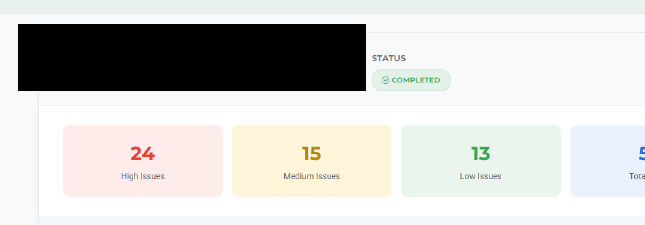
Walk through the organized findings, localized cost context, vendor follow-up, and four possible negotiation approaches. See how an agent-selected shared view supports a focused buyer conversation—and how dashboard training helps you apply the same process.
The inspection and results are authentic. Identifying details have been removed for privacy.
Inspection Response Resources
Practical education for agents navigating inspection negotiations.
Find practical guidance on prioritizing findings, discussing repair-cost ranges, and preparing an informed buyer inspection response.
Inspection workflow
How to organize a home inspection report for negotiation and reduce buyer overwhelm after the report arrives.
Repair cost context
How repair cost estimates, ZIP-code variation, and repair-versus-replace thinking can support clearer conversations.
Vendor guidance
How agents can approach contractor recommendations, vendor matching, and disclosure boundaries after inspection.
Get Started
Start with a free PropWise account.
Create a free account to access training and product details. When you are ready, purchase a subscription or a package of inspection runs from your Account page.
- Free account creation with access to training and product details.
- Built for real estate agents handling inspection response conversations.
- Choose a subscription or inspection-run package when you are ready.
Ready to get started?
Create your free account, then buy runs from your Account page.